Yes. Users wishing to be kept up to date about new software versions, updates, patches and fixes can sign up for the Hot News RSS feeds on www.epoline.org. All new software components can be downloaded and installed as soon as they are available in the Download Centre.
You can also enable the Live Update functionality in the Server Manager. Go to Settings -> Live Update Proxy and select 'Enable software update system'. You should also ensure that you have enabled the respective EPC contracting state by ticking the checkbox next to it under Tools -> Preferences -> System Preferences -> Countries. If Live Update is enabled, updates for the EP, PCT and selected national office procedures will be initiated automatically.
You can select the interval at which you would like your software to check for updates by specifying the number of days in 'Check for update every XX day(s)'. The system will then notify you at the selected interval if any new software has been released. We recommend setting the interval to '1' as it will then check once a day, the first time you start the software. You can enter your own and/or anybody else's e-mail address in the Server Manager Settings tab. Everybody on that list will then be sent an automatically generated e-mail whenever a new Live Update is available.
It is important to bear in mind that you first need to download the updates before you can install them. Downloading on its own is not sufficient to complete the process of updating. You must also install them in order to effectively apply the update to the Online Filing software.
Note: Please also read the restrictions concerning Live Update on www.epoline.org -> Download Centre -> Software -> Online Filing related software -> link to Live Update information in the text.
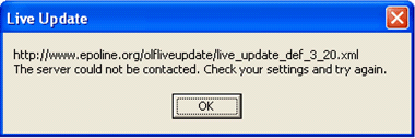
There are a number of possible reasons for this.
Note: Please also read the restrictions concerning Live Update on www.epoline.org -> Download Centre -> Software -> Online Filing related software -> link to Live Update information in the text.
This means that Live Update was not correctly configured. See question 1 for what to do.